To comply with my NDA, sensitive and confidential information has been removed or disguised. All content represents my own work and does not necessarily reflect the views of Envision or the Panama Canal Authority.
Every vessel that transits the Panama Canal
is part of a choreography nine days in the making.
The Panama Canal is one of the most vital trade routes in the world, connecting the Atlantic and Pacific Oceans and serving as the cornerstone of global maritime logistics. Thousands of vessels transit the Canal each year, carrying everything from container goods to crude oil to liquefied natural gas. A single transit takes between 8 and 10 hours. Managing the flow of those transits requires planning that begins nine days before a vessel arrives.
The scheduling system works on a rolling 9-day window, T-0 through T-9. T-0 represents today: vessels currently in transit, actively moving through the Canal. T-1 is tomorrow's scheduled transits. T-9 is nine days from now, the furthest horizon of confirmed scheduling. As each day passes, T-1 becomes T-0, T-2 becomes T-1, and the team schedules a new vessel for the T-9 slot. The system rolls forward continuously, every single day.
"Before this platform existed, the team managing one of the world's most important trade routes was doing it manually. No unified digital system. No real-time visibility. Just coordination, communication, and the professional expertise of the people on the ground."
Each transit requires the precise coordination of multiple resources beyond the vessel itself, marine pilots who board the ship and guide it through the Canal, tugboats that assist with manoeuvring, lock operators, and support teams at each stage of the journey. A scheduling conflict involving any one of these resources can cascade into delays that affect not just one vessel, but every vessel behind it. At the scale of global shipping, those delays have real economic consequences.
Four roles. One shared mission.
Zero margin for error.
The platform needed to serve multiple user types simultaneously, each with a different relationship to the 9-day schedule, different levels of operational detail, and different consequences if their part of the coordination broke down.
Designing for operational contexts is fundamentally different from designing for productivity software. In productivity software, the user controls the pace. In operational software, reality controls the pace, and the interface must keep up. The design challenge was not to help users work faster. It was to ensure they never had to search for information during a time-critical moment.
In operational UX, visual representation
of reality is not decoration, it is the interface.
The central design decision on this project was to make the 9-day scheduling window the visual spine of the entire platform. Not a table. Not a list. A visual timeline where the T-0 through T-9 days are laid out as a spatial landscape, and vessels are represented as the physical objects they are, positioned on that timeline according to their scheduled transit day.
This was the team's proudest design decision. The people who use this platform think operationally. They think about vessels as real objects moving through physical space. A list of vessel names and departure times does not match how an experienced scheduler thinks about their schedule. A visual representation, where vessels have presence, where you can see the density of a particular day at a glance, where conflicts are visible as spatial overlaps, that matches how operational minds work.
The decision required no training justification. When schedulers saw the visual timeline in testing, they immediately understood it, because it reflected the mental model they had already built through years of operational experience. The interface was not teaching them something new. It was finally speaking their language.
"The visual representation of vessels on a timeline was not a design flourish. It was the most accurate translation of operational reality into a digital interface. When the interface matches the mental model, the learning curve disappears."
Three screens. Every critical job covered.
As an MVP, the platform was scoped to the three highest-value screens, the ones that addressed the most critical operational needs and proved the platform's core value proposition before expanding further.
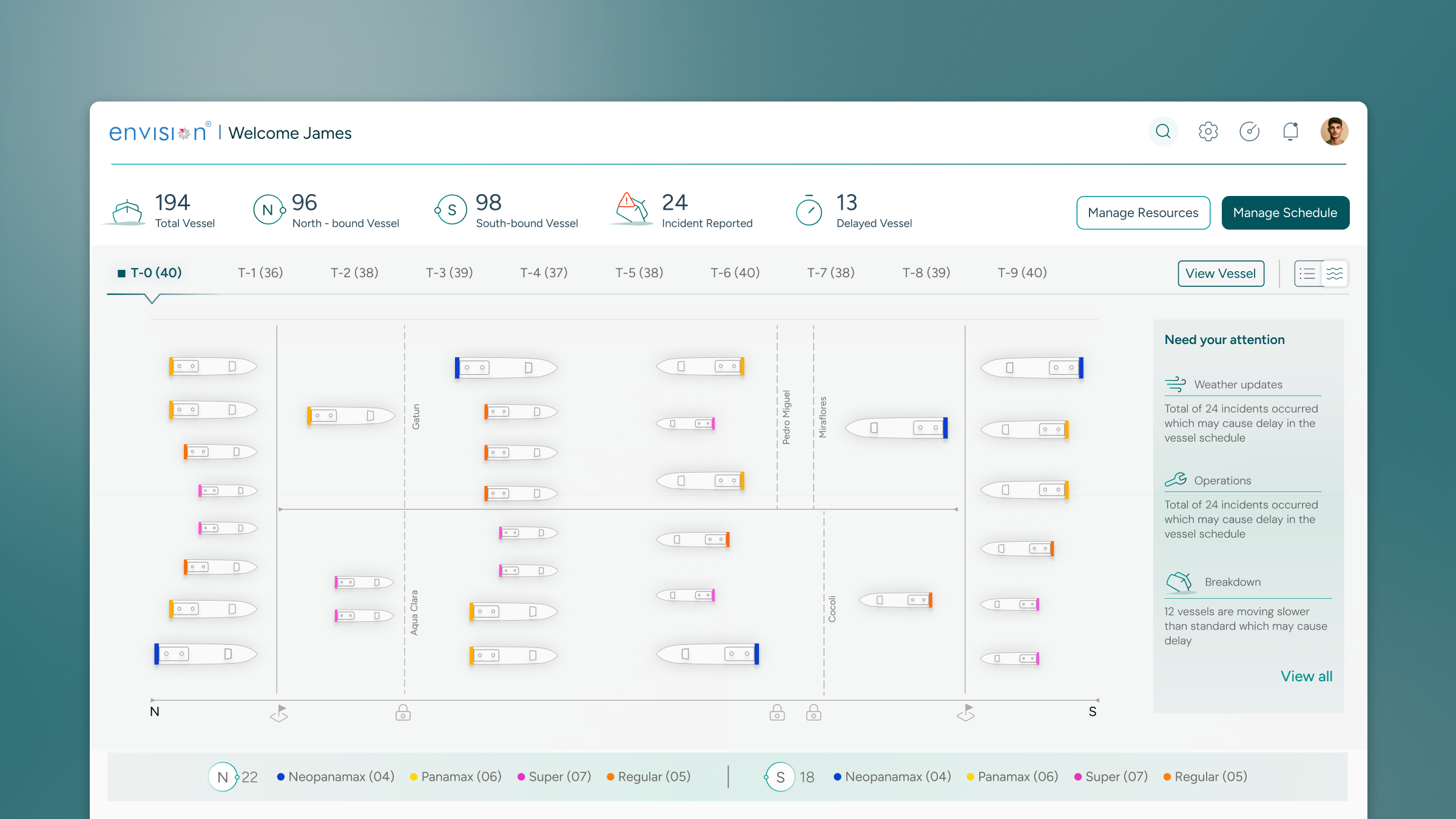
Dashboard, The Command Centre View
The dashboard was designed to answer the operations manager's first question every morning: what is the state of the Canal right now? It surfaces the T-0 through T-9 schedule as a visual overview, highlights vessels requiring attention, shows key operational metrics at a glance, and provides direct navigation to any vessel or schedule day that needs action.
The hierarchy of attention was the critical design decision, what commands the eye before anything else. Vessels in transit (T-0) always have the highest visual prominence. Approaching critical thresholds (resource conflicts, weather alerts, delayed arrivals) surface automatically. Routine transits recede into the background. The dashboard is designed so that a manager can assess the full operational picture in under a minute.
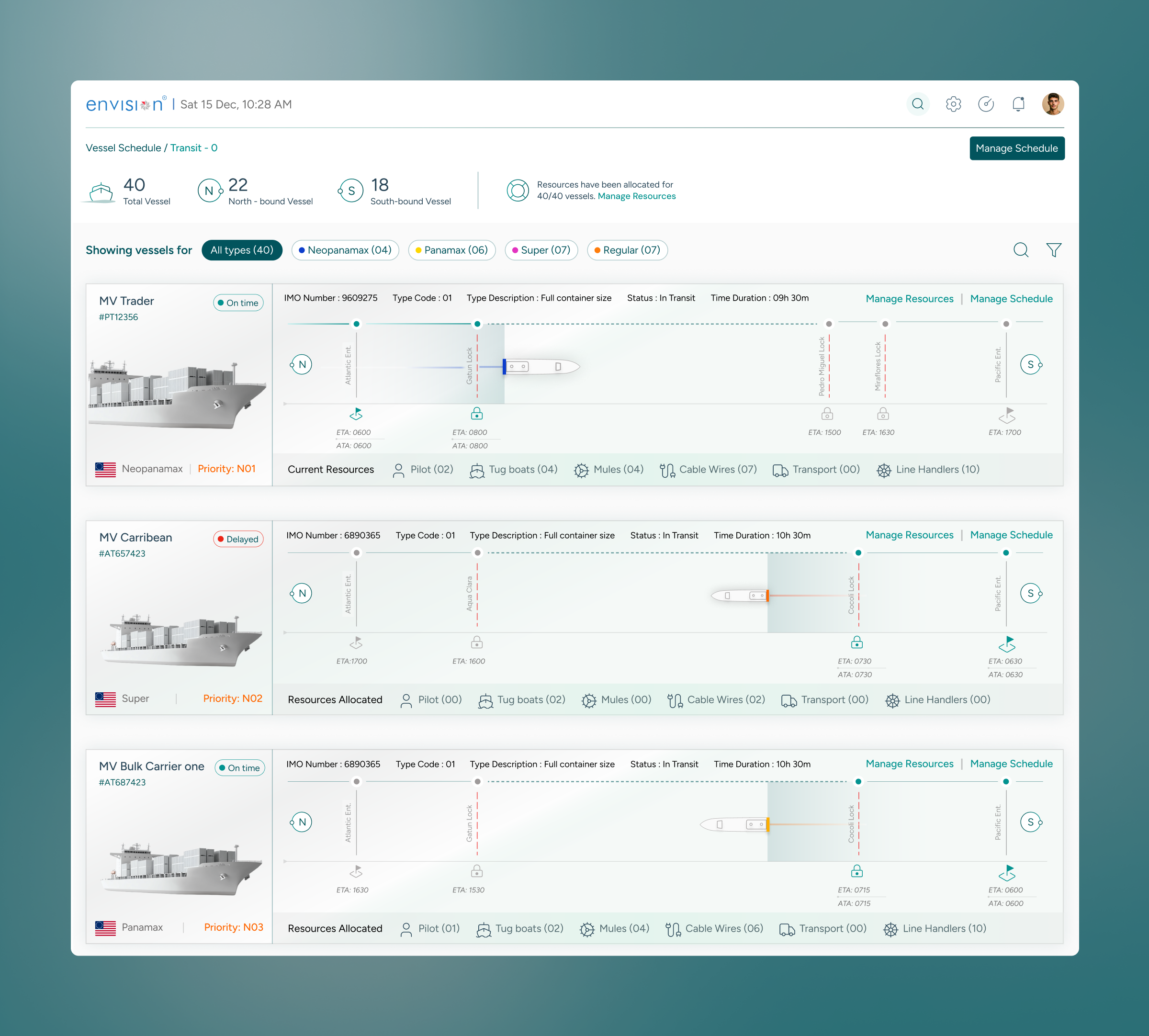
Vessel Schedule, The 9-Day Timeline
The vessel schedule screen is the operational heart of the platform, the daily workspace for Canal schedulers. It displays all vessels scheduled across the T-0 through T-9 window, with each day's transits visually represented as a timeline. Resources, pilots, tugboats, lock assignments, are visible per vessel, making conflicts immediately apparent without requiring cross-referencing.
The scheduler's workflow was mapped precisely: start with the full 9-day view to assess overall load, drill into a specific day to see detailed transit sequencing, select a vessel to review or modify its resource assignments. Every action is reachable within two interactions. The platform was designed so that the scheduler's expertise, their knowledge of the Canal, of the vessels, of the operational rhythms, was amplified by the interface, not obscured by it.
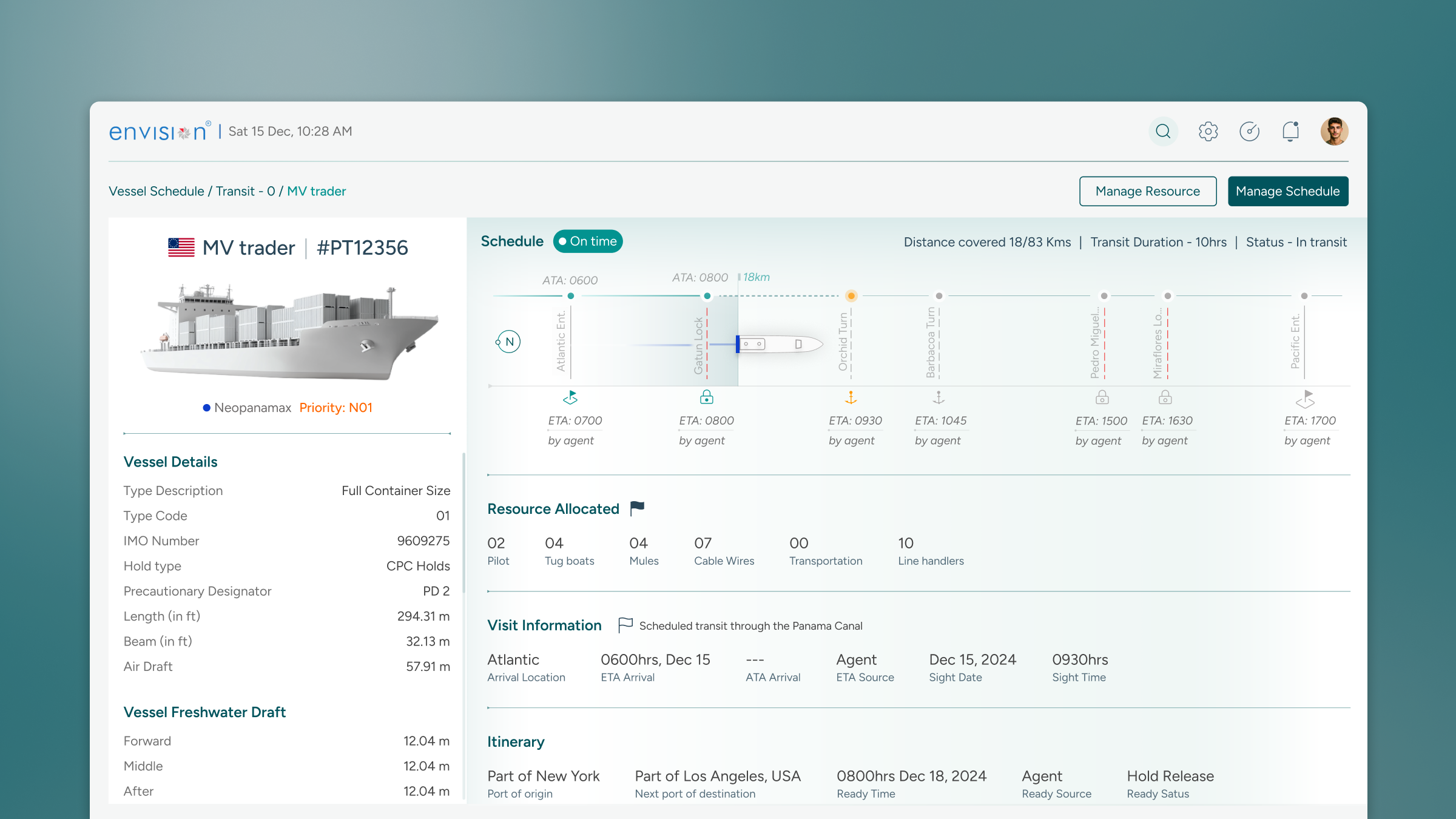
Vessel Details, Every Transit, Fully Visible
The vessel details screen provides the complete operational picture for a single transit, the information that a scheduler, supervisor, or operations manager needs when a question arises about a specific vessel. Itinerary, visit data, resource assignments, status, timeline position, and any flagged issues are all surfaced in a single view, removing the need to pull from multiple sources.
The design principle here was completeness without overwhelm. A vessel detail page contains a significant amount of information, but it is organised around a clear hierarchy: what is the vessel's current status, what resources are assigned, what is the schedule, and what requires attention. Secondary details are accessible but do not compete for primary attention.
Manual coordination became
operational intelligence.
The T-0 to T-9 visual schedule gave schedulers and managers a comprehensive overview of planned vessel activities, replacing the fragmented manual picture with a unified operational view.
Live tracking with an intuitive listing feature offered actionable insights and easy navigation within specific transit times, making real-time operational awareness possible for the first time.
Detailed vessel information with pilot and tugboat assignments enabled proactive tracking and resource allocation, addressing potential scheduling conflicts before they became operational problems.
The high-level dashboard enabled faster and more informed decision-making, giving stakeholders actionable insights at a glance rather than requiring manual status checks.
The MVP proved the platform's value and created the foundation for expanding coverage to additional operational workflows, from incident management to predictive scheduling.
Operational UX has a different definition of success than productivity UX. The measure is not efficiency gained, it is errors prevented. A single prevented scheduling conflict at the Panama Canal is worth more than any number of seconds saved per interaction. Designing for that, for the moment that does not happen because the interface made it visible in time, is the highest-stakes design work there is.
What the Panama Canal taught me about designing
for continuous awareness.
Operational contexts require a different cognitive design framework. Users are not completing discrete tasks with clear beginnings and endings. They are maintaining continuous awareness of a living system, one that is always changing, always demanding attention, and where the cost of losing awareness is immediate and real.
The hierarchy of attention, what commands the eye before anything else, is the most critical design decision in mission-critical operational interfaces. Not colour. Not typography. Not layout. Attention hierarchy. What does the scheduler see first? What do they see when something is wrong? What recedes when everything is fine? Those questions, answered correctly, are the difference between an interface that supports operational excellence and one that contributes to operational failure.
The second lesson: domain respect earns design latitude. Schedulers who have managed Canal transits for years have built operational intuitions that no designer can replicate in a project timeline. The job was not to redesign their expertise, it was to build an interface worthy of it. When the visual timeline was shown in early testing and an experienced scheduler immediately started using it to explain their scheduling logic to a colleague, that was the validation. The interface had become part of the conversation.
"The best operational interface is one that a professional can use while they are thinking about something else. Not because the interface is simple, because it has been designed so precisely around their mental model that using it requires no conscious effort at all."
To comply with my NDA, sensitive or confidential information has been removed and disguised. All information is my own and does not reflect the views of Envision or the Panama Canal Authority. Want to know more? Let's get on a call →
Want to discuss this further?